Abstract
As global organizations accelerate their migration to cloud-first infrastructure, unified identity systems, and distributed collaboration platforms, phishing has undergone a radical transformation. What began as simple deceptive emails has evolved into a sophisticated, cloud-native attack ecosystem designed to bypass multi-factor authentication, exploit trusted identity flows, and compromise entire organizational environments through a single user interaction.
This article provides an in-depth analysis of how cloud phishing has evolved over the past decade, breaks down the technical mechanics of the most dangerous modern tactics — including Adversary-in-the-Middle, consent phishing, token hijacking, and AI-driven personalized lures — and explains exactly why traditional defenses are no longer sufficient. It then presents a comprehensive, step-by-step framework for implementing Zero-Trust Account Protection, with detailed implementation checklists, policy examples, tooling guidance, and real-world case studies to help security teams eliminate cloud phishing risks at their root.
1. Introduction: The Shift to Cloud-Native Phishing
For more than 20 years, phishing followed a predictable pattern: attackers sent deceptive messages mimicking trusted brands, tricked users into entering credentials on fake login pages, and used those stolen passwords to access accounts. Defenses evolved in response: spam filters blocked obvious lures, password complexity rules made brute-force attacks harder, and two-factor authentication (2FA) added a second layer of verification. For a long time, this combination worked well enough to block most threats.
Today, however, this entire defensive model is obsolete. The shift to cloud computing, remote work, and centralized identity management has fundamentally changed both the attack surface and the attacker’s strategy. According to the 2026 Verizon Data Breach Investigations Report, 68% of all confirmed data breaches still begin with phishing — but 82% of these attacks now specifically target cloud identity systems, single sign-on (SSO) workflows, and SaaS application trust relationships.
Unlike traditional phishing, modern cloud phishing does not just target passwords — it targets trust:
- It exploits the implicit trust built into SSO, OAuth 2.0, and cross-application integrations
- It intercepts and reuses valid authentication sessions instead of guessing credentials
- It bypasses standard multi-factor authentication (MFA) by operating in real time between users and legitimate services
- It leverages legitimate cloud infrastructure, collaboration tools, and verified domains to avoid detection
- It scales automatically using AI and cloud resources, making attacks faster, more personalized, and harder to detect
To defend against this new generation of threats, organizations must stop treating phishing as an end-user problem and instead build Zero-Trust account architectures that eliminate exploitable trust entirely.
1.1 The Economic and Business Impact of Cloud Phishing
The stakes have never been higher. A successful cloud phishing attack is rarely limited to one compromised account:
- Data exfiltration: Attackers gain access to email, customer records, intellectual property, and financial data stored across dozens of connected services
- Ransomware deployment: Compromised cloud identities are the leading entry point for modern ransomware groups, who use cloud access to deploy encryption tools across entire organizations
- Supply chain compromise: Attackers use cloud access to send phishing messages to partners, vendors, and customers from trusted internal accounts
- Operational disruption: Attackers can modify settings, delete backups, or block legitimate users from accessing critical business systems
- Reputational and regulatory damage: Breaches often trigger mandatory reporting requirements, fines under GDPR, PDP, or other regulations, and permanent loss of customer trust
IBM’s 2026 Cost of a Data Breach Report found that breaches caused by cloud phishing cost an average of $5.12 million — 15% higher than the average cost of other breach vectors — due to the speed at which attackers can move across connected cloud environments.
2. Four Generations of Phishing: A Complete Evolution Timeline
To understand modern defenses, it is critical to understand how attackers have adapted to every new security control introduced over time.
Table
| Generation | Time Period | Core Attack Method | Primary Target | Key Defenses Bypassed | Technical Complexity |
|---|---|---|---|---|---|
| 1st: Basic Deception Phishing | 1990s – 2010 | Generic fake emails, copycat login pages | Individual usernames + passwords | Spam filters, basic password policies | Low |
| 2nd: Targeted Spear Phishing | 2011 – 2018 | Personalized lures, brand impersonation, context-specific messages | Executives, finance teams, system admins | Advanced spam filtering, basic user training | Medium |
| 3rd: MFA-Bypass Phishing | 2019 – 2023 | Reverse proxy attacks, real-time credential harvesting | SSO portals, MFA-protected accounts | SMS, email, and app-based MFA; perimeter defenses | Medium-High |
| 4th: Cloud-Native Identity Phishing | 2024 – Present | Token theft, OAuth consent abuse, session hijacking, AI hyper-personalization | Identity providers, API permissions, trusted sessions | Legacy MFA, password rules, domain filtering, perimeter security | High |
Sources: Verizon DBIR 2026, Mandiant Global Threat Report 2026, CrowdStrike Global Phishing Trends 2026
2.1 Why Cloud Environments Are the Ideal Attack Surface
Three core characteristics of modern cloud architecture make it uniquely vulnerable to phishing:
- Centralized Identity: Almost all cloud services rely on a single Identity Provider (IdP) such as Okta, Entra ID, or Google Workspace. Compromise this single identity, and attackers automatically gain access to every connected service — email, file storage, HR systems, finance tools, internal portals, and more.
- Distributed Access: Cloud resources are designed to be accessible from anywhere, on any device, on any network. This eliminates the traditional network perimeter that once provided a first line of defense.
- Complex Trust Chains: Modern cloud systems rely on thousands of cross-service integrations, third-party app connections, and session persistence mechanisms. Each of these relationships introduces new opportunities for abuse.
3. Deep Dive: Advanced Cloud Phishing Tactics, How They Work, and Why They Are Dangerous
Below is a detailed technical breakdown of the six most dangerous tactics in active use today, including real-world examples and exactly how they bypass standard defenses.
3.1 Adversary-in-the-Middle (AiTM) Reverse Proxy Phishing
Also known as: Real-time credential harvesting, SSO phishing, MFA interception.
This is currently the most widely used and most effective cloud phishing tactic, responsible for 41% of all cloud account compromises in 2025 (Mandiant).
How It Works
- Attackers use tools like Evilginx2, Modlishka, or AitM-as-a-Service platforms to deploy a reverse proxy that sits between the victim and the legitimate login page of your identity provider.
- The proxy obtains a valid SSL certificate, so the fake page displays the padlock icon and appears fully secure to users.
- When a user clicks the link, they see an exact replica of your organization’s SSO login page — with your company logo, correct branding, and even the same URL structure.
- When the user enters their username, password, and MFA approval, the proxy forwards every input to the legitimate service in real time, captures all credentials and session data, and establishes a valid authenticated session on the attacker’s own browser.
- The attacker is then fully logged into the account — including all connected services — while the user is seamlessly redirected to the real dashboard without noticing anything unusual.
Why It Defeats Standard Defenses
AiTM attacks intercept all authentication factors simultaneously:
- Passwords
- One-time passcodes (TOTP/HOTP)
- SMS/email codes
- Push notification approvals
- Even legacy hardware tokens that do not use domain binding
Real-World Example: In 2025, a major healthcare provider fell victim to an AiTM attack that bypassed push-based MFA. Attackers compromised 23 administrative accounts, accessed patient health records, and deployed ransomware across cloud file storage systems — all within 90 minutes of the first user clicking a link.
3.2 OAuth Consent Phishing
Also known as: App permission phishing, authorization abuse.
This tactic targets the OAuth 2.0 and OpenID Connect protocols — the industry standard that allows third-party applications to access cloud accounts.
How It Works
- Attackers register a fake application that mimics a legitimate internal or business tool: names like “Invoice Approval Portal,” “Secure Document Review,” or “Company HR Update.”
- They use legitimate-looking domains or subdomains to host the app, and often obtain “verified publisher” status through misleading information.
- Users receive messages via email, Teams, or Slack asking them to “sign in to view this file” or “verify access to continue using the service.”
- When the user clicks “Sign in with Microsoft/Google/Okta,” they are redirected to your legitimate SSO page — the authentication process itself is completely real and secure.
- After logging in, the user sees an OAuth consent screen asking for permissions such as:
- “Read all files in your OneDrive / Google Drive”
- “Send emails on your behalf”
- “Access all user profile data”
- Most users click “Accept” without reading the full permission list. Once approved, attackers gain permanent API access to the account — even if the user later changes their password.
Why It Defeats Standard Defenses
- The login process itself is legitimate, so spam filters and browser security tools cannot flag it.
- Users do not recognize the consent screen as a “phishing request” — they trust the familiar SSO branding.
- Most organizations allow all users to approve third-party apps by default, with no admin oversight.
3.3 Session Token Hijacking and Cookie Theft
Instead of stealing credentials, attackers steal session tokens — encrypted files stored in browsers that keep users logged in for days or weeks without re-authenticating.
How It Works
- Attackers distribute malicious browser extensions, compromised websites, or malware that silently extracts valid session cookies and tokens from the user’s browser.
- Tokens are sent to attacker-controlled servers, then imported into the attacker’s browser using tools like “Cookie Editor.”
- Once imported, the attacker is automatically logged into the target account — no password, no MFA, no interaction required.
- Many cloud services accept these tokens without additional verification, even if the attacker is on a different device or in a different country.
Why It Defeats Standard Defenses
- Tokens bypass all authentication steps entirely.
- Legacy session policies do not tie tokens to specific devices or locations.
- Tokens remain valid for days or weeks, giving attackers ample time to move laterally and exfiltrate data.
3.4 IdP and Brand Impersonation
Attackers create near-perfect replicas of your organization’s official login pages, using domain tricks to avoid detection.
How It Works
- Attackers use domains like
okta-verify-security-update.com,login.microsoft365.cloud, orsso.yourcompany-support.net— visually similar to official domains but with subtle differences. - They send messages claiming: “Your session will expire in 10 minutes — click here to verify your account” or “Unusual login detected — confirm your identity now.”
- The page uses your exact logo, color scheme, and layout, so even trained users struggle to spot the difference.
Why It Defeats Standard Defenses
- Modern domain filtering only blocks known malicious domains — attackers use new domains every few days.
- Most users do not check the full URL path or verify domain ownership.
3.5 AI-Powered Hyper-Personalized Phishing
Generative AI has eliminated the biggest weakness of traditional phishing: generic, easily detected language.
How It Works
- Attackers scrape public data from LinkedIn, company websites, press releases, and leaked internal communications to build detailed profiles of individual employees.
- They use AI to write messages that match your organization’s exact tone, terminology, and internal context — referencing real projects, colleagues, or deadlines.
- Messages are written in perfect local language, free of the spelling or grammar errors that once flagged phishing attempts.
- AI also adapts messages dynamically based on how the victim responds, increasing trust over time.
Why It Defeats Standard Defenses
- Spam filters rely on detecting known templates or keywords — AI generates unique messages every time.
- Even highly trained users fall for messages that reference specific internal details.
3.6 SaaS-to-SaaS and Internal Tool Phishing
This tactic operates entirely inside trusted cloud environments, making it almost invisible to external security tools.
How It Works
- Attackers compromise one low-risk account, then send phishing links via Microsoft Teams, Slack, Google Chat, or internal file sharing tools.
- Messages appear to come from colleagues or trusted internal accounts, so users click links without hesitation.
- Links lead to phishing pages hosted on legitimate cloud storage services like
sites.google.comorsharepoint.com, which are automatically trusted by most security tools.
4. Why Traditional Defenses Are No Longer Enough
Most organizations still rely on controls that were designed for an earlier era of phishing — and all of them fail against modern cloud tactics:
Table
| Traditional Defense | How It Fails Against Cloud Phishing |
|---|---|
| Password Complexity Rules | Attackers harvest passwords directly from users or bypass them entirely using tokens and sessions — they never need to guess |
| SMS / Email / App Push MFA | Fully intercepted by AiTM attacks; users often approve push notifications by accident out of habit |
| Spam and Email Filtering | Cannot detect messages sent via internal collaboration tools or AI-generated personalized content |
| Perimeter Firewalls | Cloud resources are accessible from anywhere — there is no perimeter to block |
| User Awareness Training | Does not stop consent phishing, token theft, or AiTM attacks that use legitimate login pages |
| Domain Blocking | Attackers register new domains every few hours and use legitimate cloud domains for hosting |
| Password Rotation Policies | Do not revoke OAuth permissions or invalidate active session tokens |
5. Zero-Trust Account Protection: Core Philosophy and Principles
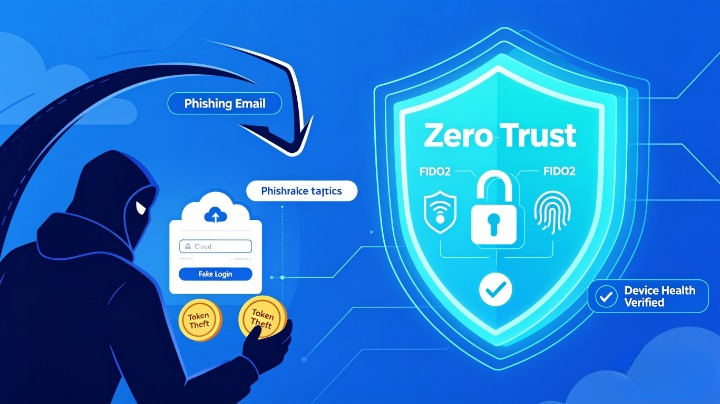
Zero-Trust Account Protection is not a single tool — it is a fundamental shift in how you approach access security, based on the core mantra: “Never trust any person, device, request, or service — always verify every single time, no exceptions.”
Instead of the old model: “Authenticate once, trust the session forever, grant broad access” — Zero Trust follows: “Verify continuously, grant only what is strictly needed, assume compromise at every step.”
5.1 Six Foundational Principles for Cloud Account Defense
- Identity is the only perimeter: Security follows the user and their context, not the network location they connect from.
- Eliminate phishable authentication entirely: Only use authentication methods that cannot be intercepted or tricked.
- Least privilege by default: Every user, app, and service starts with zero access — grant only the exact minimum permissions required.
- Verify full context on every request: Before granting access, validate identity, device health, location, behavior, and risk level.
- Minimize trust duration: No permanent sessions, no permanent permissions, no long-lived tokens.
- Assume breach: Design every system and policy under the assumption that credentials have already been compromised.
6. Complete Implementation Roadmap: Build Zero-Trust Account Protection in 12 Months
This step-by-step plan includes technical controls, policy examples, success metrics, and common pitfalls to avoid.
Phase 1: Foundation — Eliminate Phishable Authentication (0–3 Months)
This phase is non-negotiable — no other controls will fully protect you if authentication can be bypassed.
Key Actions:
- Mandate phish-resistant authentication for all users:
- ✅ Deploy: FIDO2 security keys (YubiKey, Google Titan), passkeys, or certificate-based authentication
- ❌ Block permanently: SMS codes, voice calls, email OTPs, authenticator app TOTP, and push notifications
- Why: FIDO2 and passkeys use domain-bound public-key cryptography — they will never release credentials to fake sites, even if a user is tricked into approving access.
- Enforce single sign-on (SSO) for every service:
- Disable all direct username/password login for SaaS tools, admin consoles, and internal applications — every login must pass through your central IdP.
- Block legacy authentication protocols:
- Disable IMAP, POP3, SMTP basic auth, and ActiveSync — these protocols bypass MFA entirely and are the most common entry point for credential stuffing.
Authentication Security Comparison:
Table
| Method | Resists AiTM? | Resists Social Engineering? | Resists Token Theft? | Recommendation |
|---|---|---|---|---|
| SMS / Email OTP | ❌ No | ❌ No | ❌ No | ❌ Disable immediately |
| TOTP (Google Authenticator) | ❌ No | ❌ No | ❌ No | ⚠️ Phase out completely |
| Push Notifications | ❌ No | ❌ No | ❌ No | ⚠️ Phase out completely |
| FIDO2 Hardware Key | ✅ Yes | ✅ Yes | ✅ Yes | ✅ Mandatory for all users |
| Passkey | ✅ Yes | ✅ Yes | ✅ Yes | ✅ Preferred for all use cases |
Success Metrics:
- 100% of users use only phish-resistant authentication
- 0 services allow direct password login
- Legacy authentication protocols blocked across all tenants
Phase 2: Block Third-Party and OAuth Risks (3–6 Months)
This phase eliminates consent phishing and unauthorized API access.
Key Actions:
- Restrict user consent capabilities:
- Disable user consent entirely for all high-risk permission scopes: email access, file access, contact access, and permissions to act on the user’s behalf.
- Require mandatory admin approval for any third-party app requesting access to corporate data.
- Enforce verified publisher requirements:
- Block all apps that are not published by verified vendors on official cloud marketplaces.
- Apply least-privilege permission limits:
- Never grant “full access” — limit permissions to read-only or strictly necessary actions only.
- Conduct full connected app audits:
- Revoke access for all unused, unapproved, or suspicious apps; repeat this audit quarterly.
Success Metrics:
- 0 unapproved apps have access to corporate accounts
- No user can grant high-risk permissions without admin approval
- All third-party apps use the minimum required permissions
Phase 3: Context-Aware Access Policies (6–9 Months)
Add dynamic checks that stop attackers even if they somehow obtain valid credentials.
Key Actions:
- Managed device requirement:
- Only grant access to sensitive data and systems from devices that are corporate-managed, compliant with security policies, have up-to-date patches, and run endpoint protection software.
- Block unmanaged personal devices from accessing email, files, or internal portals.
- Location and network controls:
- Block access entirely from countries or regions where your organization has no legitimate business operations.
- Require step-up authentication for access from unknown locations, anonymous networks (Tor/VPN), or untrusted IP ranges.
- Behavioral anomaly detection:
- Configure rules to flag and block requests that deviate from normal patterns: unusual login times, sudden bulk data downloads, access from new devices, or attempts to modify security settings.
- Session controls:
- Limit maximum session duration to 1–4 hours for standard users, and 1 hour for administrative accounts.
- Force full re-authentication for high-risk actions: changing passwords, modifying permissions, or accessing financial systems.
Success Metrics:
- 0 unmanaged devices access sensitive resources
- Access from unapproved regions is fully blocked
- All high-risk actions require additional verification
Phase 4: Token and Session Hardening (9–12 Months)
Eliminate the risk of stolen token reuse.
Key Actions:
- Reduce token validity: Shorten access token lifetime to 60 minutes or less.
- Enforce token binding: Tie session tokens exclusively to the specific device and browser session they were created on — so stolen tokens cannot be imported or used elsewhere.
- Automatic revocation: Configure policies to immediately invalidate all sessions and tokens when a user’s password is reset, suspicious activity is detected, or the user leaves the organization.
Phase 5: Continuous Validation and Improvement (Ongoing)
Zero Trust is not a one-time project — it requires ongoing work:
- Run quarterly simulated cloud phishing tests and red team exercises to identify gaps.
- Update policies whenever new tactics or threats emerge.
- Conduct annual reviews of permission models and access rules.
- Train users specifically on OAuth consent risks, domain verification, and reporting procedures.
7. Real-World Case Studies
Case Study 1: Financial Services Firm Eliminates AiTM Attacks
Organization: Regional bank with 5,200 employees across 8 countries.
Challenge: In 2024, the bank suffered three separate AiTM attacks that bypassed push-based MFA, compromising 19 accounts and exposing customer financial data.
Implementation:
- Migrated all users to FIDO2 hardware keys
- Blocked all legacy MFA methods and legacy authentication
- Enforced managed device requirements and OAuth restrictions Result: Within 90 days, all successful cloud phishing attempts dropped to zero. No account compromises occurred in the following 12 months.
Case Study 2: Technology Company Stops Consent Phishing
Organization: SaaS provider with 3,400 employees.
Challenge: Attackers used consent phishing to gain access to 42 employee accounts, exfiltrating source code and customer data.
Implementation:
- Disabled end-user consent for all high-risk permissions
- Implemented admin approval workflows for all third-party apps
- Conducted full audit of 1,200+ connected applications Result: 98% of unapproved apps were removed, and no further consent phishing attacks succeeded.
8. Conclusion
Cloud phishing has evolved faster than almost any other cyber threat — and it now targets the very foundation of cloud convenience: trust. Passwords, basic MFA, and traditional awareness training are no longer enough to protect your organization.
Zero-Trust account protection is the only proven defense against modern cloud phishing. By replacing phishable authentication, eliminating exploitable trust relationships, verifying every request in full context, and designing your systems under the assumption that compromise is inevitable, you build an environment where even the most advanced attacks cannot succeed.
Security is not a destination — it is a continuous process. As attackers develop new tactics, your Zero-Trust framework must evolve with them, with regular testing, policy updates, and ongoing vigilance.