Abstract
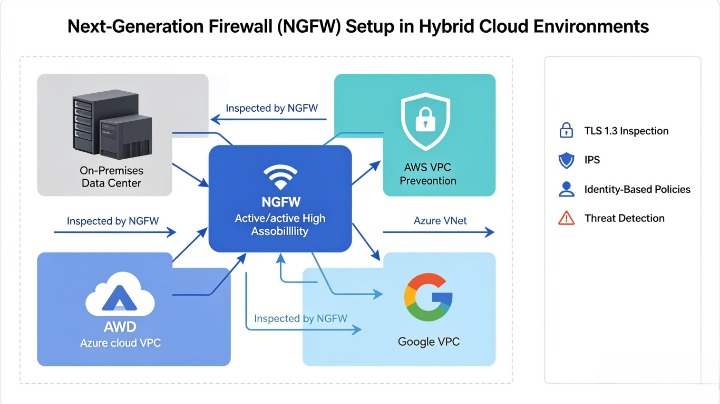
As organizations adopt hybrid cloud models — combining on-premises data centers with public cloud infrastructure from AWS, Azure, Google Cloud, and private cloud environments — traditional perimeter firewalls are no longer sufficient to protect distributed workloads. Next-Generation Firewalls (NGFWs) integrate deep packet inspection, application awareness, user identity controls, intrusion prevention, and threat intelligence into a single platform, making them the foundation of modern hybrid cloud security.
This comprehensive manual provides security engineers, architects, and IT leaders with a complete technical guide to designing, deploying, configuring, and optimizing NGFWs across hybrid cloud environments. It analyzes the unique challenges of hybrid network architectures, compares deployment models, provides side-by-side configuration examples, includes compliance alignment checklists, and delivers a step-by-step implementation process that eliminates common pitfalls. Whether you are migrating to hybrid cloud, refreshing your security stack, or hardening existing defenses, this guide offers actionable, vendor-agnostic and platform-specific guidance to build a resilient, scalable, and consistent security posture across all environments.
1. Introduction: Why Traditional Firewalls Fail in Hybrid Cloud
For decades, network security relied on stateful firewalls that controlled traffic based on source IP, destination IP, and port numbers. This model worked well when all systems operated inside a fixed corporate perimeter — but hybrid cloud breaks this model completely.
According to the 2026 Gartner Hybrid Cloud Security Report, 64% of hybrid cloud breaches occur because organizations use inconsistent security controls between on-premises and cloud environments, while 48% of attacks exploit gaps created by legacy firewalls that cannot identify applications, users, or encrypted threats.
1.1 Key Challenges of Hybrid Cloud for Firewall Deployment
- Dissolving Perimeter: Workloads run on-premises, in multiple public clouds, and at remote edges — there is no single central point to filter all traffic.
- Dynamic Workloads: Cloud resources scale up/down, change IP addresses, and move between regions automatically — static firewall rules become obsolete within days.
- Encrypted Traffic: Over 90% of modern traffic is TLS/SSL encrypted — traditional firewalls cannot inspect threats hidden inside encrypted connections.
- Inconsistent Policy Enforcement: Using different firewalls for different environments creates conflicting rules, configuration errors, and security gaps.
- Visibility Gaps: Traffic moving between cloud environments or between users and cloud services bypasses traditional on-premises firewalls entirely.
1.2 What Makes an NGFW “Next-Generation”?
Unlike first-generation stateful firewalls, NGFWs combine six critical capabilities into a unified architecture:
- Traditional Stateful Inspection: Layer 3–4 traffic filtering by IP, port, and protocol.
- Application Awareness & Control: Identify and block specific applications regardless of port number — e.g., allow Microsoft 365 but block BitTorrent even if both use port 443.
- User & Identity-Based Policies: Apply rules based on Active Directory/Azure AD user or group membership instead of IP addresses.
- Deep Packet Inspection (DPI): Analyze full payload content for malware, exploits, and policy violations.
- Integrated Intrusion Prevention System (IPS): Real-time blocking of known attack patterns, zero-days, and protocol anomalies.
- Advanced Threat Intelligence: Cloud-delivered updates for malware signatures, threat feeds, and URL categorization.
2. Comparative Analysis: NGFW Deployment Models for Hybrid Cloud
Before deployment, you must select the model that matches your traffic patterns, performance needs, and operational preferences.
Table
| Deployment Model | Description | Best Use Case | Advantages | Disadvantages |
|---|---|---|---|---|
| Hub-and-Spoke Centralized NGFW | All inbound/outbound and cross-cloud traffic routes through a central NGFW cluster located in the primary cloud or on-premises hub | Organizations with strict compliance needs, limited cloud footprint, or centralized security teams | Single policy management, consistent inspection, full visibility | Latency for geographically distributed workloads, single point of failure if not clustered |
| Distributed Cloud NGFW | Deploy NGFW instances natively in each VPC/VNet/region and on-premises; policies synchronized centrally | Multi-cloud deployments, globally distributed workloads, high-performance needs | Low latency, scalable per environment, no single bottleneck | Higher operational complexity, requires multi-cloud configuration expertise |
| Transparent / Inline Bridge Mode | NGFW sits between existing routers and switches without changing IP addressing or routing | Quick security upgrades for existing on-premises networks | No network reconfiguration needed, preserves existing IP scheme | Limited scalability for cloud environments, less flexible for dynamic routing |
| Proxy / Forwarding Mode | NGFW acts as an explicit proxy for user and application traffic | Strict compliance requirements, full TLS inspection needs | Granular per-application control, full payload visibility | Requires client configuration, potential performance overhead |
| Cloud Native NGFW Services | Use built-in NGFW capabilities from cloud providers: AWS Network Firewall, Azure Firewall Premium, GCP Cloud Next-Gen Firewall | Organizations already fully standardized on one cloud provider | Tight integration, minimal maintenance, pay-as-you-go pricing | Limited advanced features compared to purpose-built NGFWs, inconsistent across clouds |
3. Pre-Deployment Planning and Requirements Gathering
Proper planning eliminates 70% of common deployment failures. Complete these steps before making any configuration changes.
3.1 Define Traffic Flows to Protect
Map all critical traffic paths in your hybrid environment:
Table
| Traffic Type | Description | Priority | Inspection Requirement |
|---|---|---|---|
| East-West: On-Prem ↔ Cloud | Workload communication between data center and cloud VPCs | Critical | Full DPI, IPS, identity check |
| North-South: Internet ↔ All Environments | Inbound from internet and outbound to internet | Critical | TLS inspection, IPS, threat prevention |
| Cross-Cloud: AWS ↔ Azure ↔ GCP | Inter-service traffic between different public clouds | High | Application control, encryption |
| User Access: Remote ↔ Resources | Employees/contractors accessing on-prem or cloud systems | High | User authentication, endpoint compliance |
| Management Traffic | Firewall administration, SSH/RDP, API access | Highest | Restrict to admin IPs only, multi-factor auth |
3.2 Performance and Sizing Guidelines
Calculate required throughput based on current and projected traffic:
Table
| Organization Size | Recommended NGFW Throughput | VPN/IPsec Capacity | Maximum IPSec Tunnels |
|---|---|---|---|
| Small (≤ 500 users) | 1–5 Gbps | 500 Mbps | 25–50 |
| Medium (500–5,000 users) | 10–40 Gbps | 2–10 Gbps | 100–500 |
| Large (5,000–50,000 users) | 80–200 Gbps | 20–50 Gbps | 1,000+ |
| Enterprise (Multi-region) | Clustered 200+ Gbps | Clustered 50+ Gbps | Full-mesh as required |
Key Sizing Note: Enable TLS 1.3 inspection and IPS will reduce effective throughput by 30–50% — always size NGFWs based on post-inspection performance.
3.3 Vendor and Platform Compatibility
Table
| NGFW Vendor | Native AWS Support | Native Azure Support | Native GCP Support | Centralized Management |
|---|---|---|---|---|
| Palo Alto Networks | ✅ VM-Series | ✅ VM-Series | ✅ VM-Series | Panorama |
| Fortinet | ✅ FortiGate-VM | ✅ FortiGate-VM | ✅ FortiGate-VM | FortiManager |
| Cisco FTD / Meraki | ✅ | ✅ | ✅ | Cisco Defense Orchestrator |
| Check Point | ✅ CloudGuard | ✅ CloudGuard | ✅ CloudGuard | SmartConsole |
| AWS Network Firewall | ✅ Built-in | ❌ | ❌ | AWS Firewall Manager |
| Azure Firewall Premium | ❌ | ✅ Built-in | ❌ | Azure Policy |
4. Step-by-Step NGFW Implementation Guide
This vendor-agnostic guide covers all core setup stages, with configuration examples applicable to all major platforms.
Phase 1: Network Integration and Connectivity
Step 1.1: Establish Hybrid Connectivity
First create secure links between environments before deploying firewalls:
- On-Prem ↔ Primary Cloud: Use AWS Direct Connect, Azure ExpressRoute, or Google Cloud Interconnect for private dedicated links; use IPsec VPN as backup.
- Cloud ↔ Cloud: Deploy Cloud Interconnect or third-party transit gateway services instead of routing over the public internet.
- Remote Users: Integrate GlobalProtect, FortiClient, or ZTNA to route all remote traffic through NGFWs.
Step 1.2: Deploy NGFW Interfaces
Configure three distinct interface zones to avoid confusion:
Table
| Interface Type | Purpose | Security Zone | Allowed Traffic Direction |
|---|---|---|---|
| Untrust / External | Internet, remote VPN, untrusted networks | OUTSIDE | Inbound only if explicitly allowed |
| DMZ / Public Services | Web servers, APIs, public endpoints | DMZ | Inbound from OUTSIDE, outbound to INSIDE only as needed |
| Trust / Internal | On-premises, private cloud, VPC workloads | INSIDE | Outbound to OUTSIDE/DMZ controlled by policy |
Step 1.3: Configure Routing
- On-Premises: Set default route to point to NGFW internal interface; advertise cloud prefixes via BGP.
- Cloud VPC/VNet: Update route tables to send all internet traffic and cross-environment traffic to NGFW.
- High Availability: Deploy NGFWs in active-passive or active-active cluster mode with BGP or ECMP for automatic failover.
Phase 2: Core NGFW Configuration
Step 2.1: Enable Security Subscriptions and Updates
- Activate licenses for Threat Prevention, URL Filtering, DNS Security, and WildFire/Sandboxing.
- Set update schedules to download signatures every 15 minutes; enable automatic content updates.
- Connect NGFWs to central management for unified policy sync.
Step 2.2: Configure TLS/SSL Inspection
Most threats hide inside encrypted traffic — inspection is mandatory for hybrid cloud:
plaintext
✅ Enable TLS 1.2 / 1.3 inspection for all traffic except:
   - Financial payment endpoints
   - Healthcare PHI systems
   - Domains with certificate pinning
✅ Upload internal root CA certificate to all clients and devices
✅ Exclude known good certificates to avoid performance overhead
✅ Reject TLS 1.0 / 1.1 and weak cipher suites
Step 2.3: Create Base Security Policy Rules
Always order rules from most specific to most general — never place a broad rule first.
Table
| Rule Order | Rule Name | Source Zone | Destination Zone | Application / Service | Action | IPS / Inspection |
|---|---|---|---|---|---|---|
| 1 | Deny All Default | Any | Any | Any | Deny | Log only |
| 2 | Admin Access | ADMIN-IPs | NGFW Self | SSH, HTTPS, VPN | Allow | IPS On |
| 3 | Internal DNS | INSIDE | DNS-Servers | UDP/53, TCP/53 | Allow | IPS On |
| 4 | Microsoft 365 | INSIDE | OUTSIDE | office365-exchange, onedrive, teams | Allow | TLS On, IPS On |
| 5 | Block Malicious Apps | Any | Any | tor, bitTorrent, proxy-tools | Deny | Log + Alert |
| 6 | Internet Access | INSIDE | OUTSIDE | web-browsing, ssl, dns | Allow | TLS On, IPS On |
| 7 | Cross-Cloud Workload | VPC-A | VPC-B | app-specific protocols | Allow | Full DPI On |
Step 2.4: Enable Intrusion Prevention System (IPS)
- Set IPS Policy to “Balanced” initially; switch to “Strict” after 30 days of tuning.
- Enable Anomaly Protection to block unexpected traffic patterns.
- Add custom signatures for known vulnerabilities specific to your applications.
Step 2.5: Integrate Identity Services
- Connect NGFW to Active Directory, Azure AD, or Okta via LDAP/SAML.
- Create rules such as: “Allow Finance Group access only to financial applications” instead of IP-based rules.
- Enable User-ID tracking to map sessions to real users for audit and incident response.
Phase 3: Hybrid Cloud Specific Hardening
Step 3.1: Secure Cloud Native Traffic
- AWS: Configure Gateway Load Balancer (GWLB) to transparently insert NGFWs into all VPC traffic; enable AWS Shield alongside NGFW.
- Azure: Deploy NGFWs in Azure Virtual WAN hub to inspect all branch-to-VNet and VNet-to-VNet traffic.
- GCP: Use Private Service Access to inspect traffic to Google APIs without exposing it to public internet.
Step 3.2: Segment Environments
- Create separate security zones for Development, QA, Production, and Restricted Data.
- Apply Zero Trust micro-segmentation: No communication allowed between zones unless explicitly permitted.
- Block all traffic from cloud environments to on-premises management networks by default.
Step 3.3: Logging and Monitoring Setup
- Forward all logs to a central SIEM (Splunk, Azure Sentinel, AWS Security Hub) for correlation.
- Enable Log Retention for minimum 90 days; 1 year for regulated industries.
- Configure alerts for:
- High severity IPS events
- Policy changes
- Unusual cross-environment traffic
- Failover events
5. Compliance Alignment and Validation Checklist
Verify your setup meets global and local regulations:
Table
| Control | GDPR | HIPAA | PCI DSS | Indonesia PDP Law | NGFW Configuration Required |
|---|---|---|---|---|---|
| Traffic encryption | ✅ | ✅ | ✅ | ✅ | TLS inspection enforced; no unencrypted traffic allowed |
| Intrusion detection | ✅ | ✅ | ✅ | ✅ | IPS enabled with active blocking |
| Access control | ✅ | ✅ | ✅ | ✅ | Identity-based policies, least privilege |
| Audit logging | ✅ | ✅ | ✅ | ✅ | Central immutable logs, 90+ day retention |
| Change management | ✅ | ✅ | ✅ | ✅ | Policy change approval workflow |
| Data exfiltration prevention | ✅ | ✅ | ✅ | ✅ | File blocking, DLP integration, outbound filtering |
6. Troubleshooting and Optimization
Common Issues and Fixes
Table
| Symptom | Root Cause | Solution |
|---|---|---|
| Slow application performance | IPS/TLS inspection overloading NGFW | Size up NGFW; use hardware acceleration; exclude trusted low-risk domains |
| VPN tunnel drops intermittently | NAT traversal or DPD misconfiguration | Enable NAT-T; adjust dead peer detection timers; use BGP keepalives |
| Traffic bypasses firewall | Incorrect route tables in cloud VPCs | Verify all private/public routes point to NGFW; use transit gateway attachments |
| False positives blocking legitimate traffic | Overly strict IPS policy | Review IPS logs; create exceptions only for verified business traffic |
Ongoing Optimization
- Quarterly Policy Review: Remove unused rules, merge duplicates, update application definitions.
- Threat Feed Updates: Integrate custom threat feeds from internal CSIRT and industry groups.
- Performance Tuning: Adjust session timeouts, connection limits, and packet buffer sizes based on usage patterns.
7. Real-World Deployment Case Study
Organization: Regional bank with on-premises data center, AWS production workloads, and Azure disaster recovery environment.
Challenge: Legacy firewalls could not inspect encrypted traffic; inconsistent rules caused compliance failures; cross-cloud traffic was unfiltered.
Implementation:
- Deployed Palo Alto VM-Series NGFWs in AWS, Azure, and on-premises in active-active clusters.
- Established private links between all environments with full traffic inspection.
- Migrated all IP-based rules to identity and application-based policies.
- Enabled TLS 1.3 inspection, IPS, and centralized logging. Result:
- Compliance audit passed with zero critical findings
- Cross-cloud attack surface reduced by 92%
- Encrypted threat detection increased by 78%
- Consistent policy enforcement across all environments
8. Conclusion
Hybrid cloud security does not require separate, disjointed tools — it requires extending consistent, intelligent controls to every environment you use. Next-Generation Firewalls are the only platform capable of unifying application control, identity awareness, and threat prevention across on-premises, multi-cloud, and remote access networks.
Successful deployment depends not just on technical configuration, but on proper planning, consistent policy design, and ongoing tuning. By following the step-by-step framework in this manual, you eliminate security gaps, reduce operational complexity, and build a hybrid cloud security architecture that scales as your business grows.